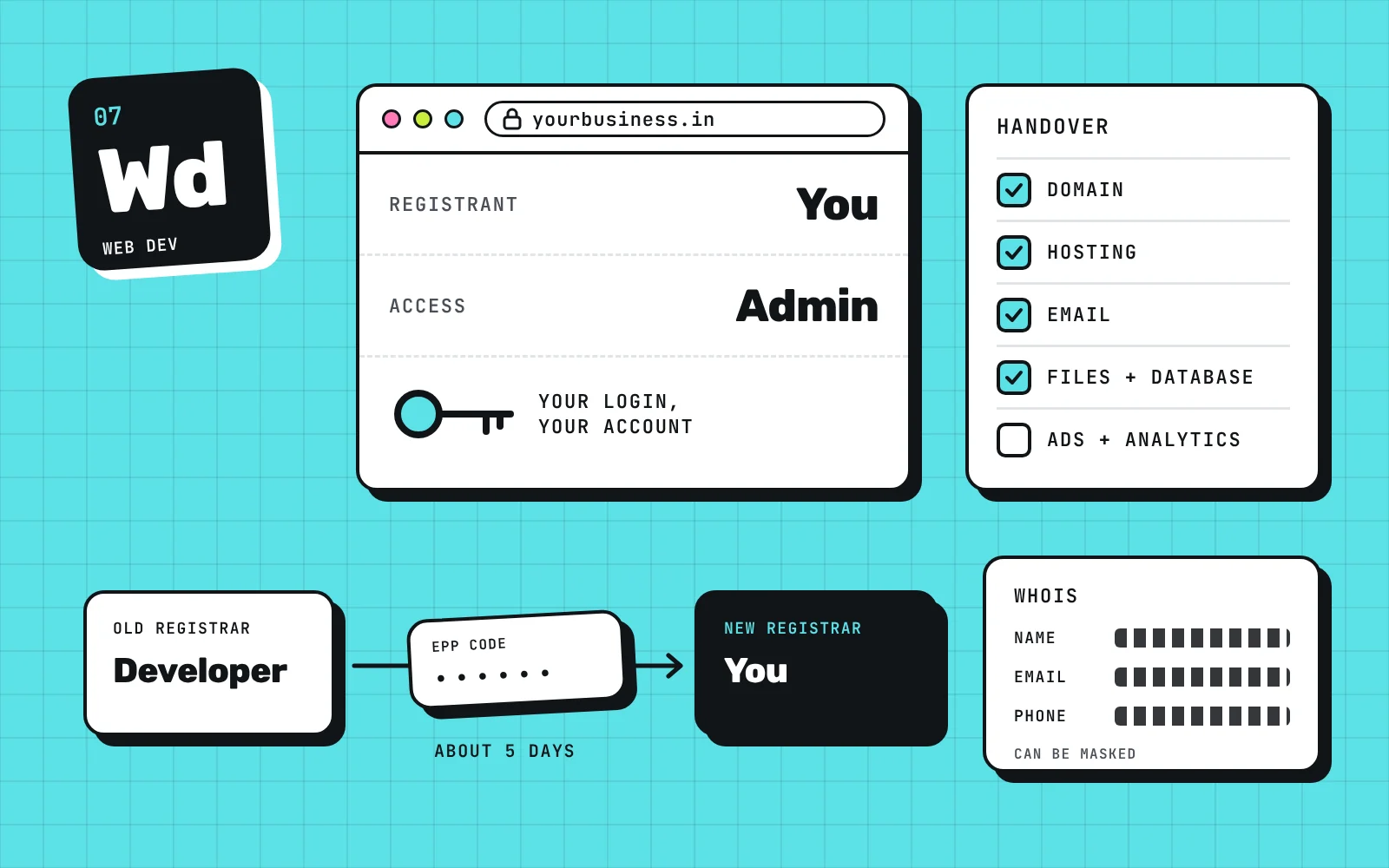
You own your website and domain only if your name is on the domain registration and you hold the admin login for the registrar, the hosting and the website files. If a developer or agency bought them in their own name, they are the owner on paper, whatever your invoice says. Getting them back is simple when the developer cooperates and often impossible when they do not, so the best time to fix this is before you sign.
We build websites at Brand E5, so we see both sides of this. Owners come to us after a developer disappeared or after an exit fee that made no sense. The pattern is the same each time: nobody checked who held the logins until something went wrong.
How do I check who owns my domain?
Start with a WHOIS lookup. It tells you the registrar the domain is held with and, on many domains, the registration details. The .IN registry lists this as the first step of any transfer: find the current registrar through WHOIS.
Do not stop there. WHOIS details can be masked by a privacy service, and a name on a record is not the same as control. The test that matters is the login. Can you sign in to the registrar yourself, see the domain in your own account, and change its settings? We ask owners to cross-check that they have admin access, not a simple user login that only lets them look.
Run the same test for everything else the website depends on:
| What | Where to check | Proof that it is yours |
|---|---|---|
| Domain | The registrar account | You log in as admin and the domain is in your account |
| Hosting | The hosting control panel | You can log in, download files and reset the password |
| Business email | The mail provider | You can create and remove mailboxes |
| Website files and database | Hosting or the developer’s repository | You hold a recent copy you can open |
| Google Business Profile, analytics and ad accounts | Each platform | Your own Google or Meta login is listed as owner |
If any row fails, that is the part to fix first.
What should I ask a developer to hand over?
The list depends on the tools your site uses. A simple brochure site has a domain, hosting and files. A site with forms, payments, WhatsApp or automation has more, and each one has its own login.
Ask for the workflow first: a plain list of every tool and service the website uses, with the account each one sits in. Then check what you are given against that list. Do not accept a spreadsheet of passwords on trust. Log in to each item yourself.
The full ask looks like this:
- The registrar login, with admin access to the domain.
- The hosting login, and the control panel or server details.
- A full copy of the website files and the database.
- Business email logins and where the mail is hosted.
- Analytics, Search Console, Google Business Profile and any ad accounts, with you as owner.
- The login for any other service the site depends on, such as a form tool, a payment gateway or an automation tool.
- Any custom code, and a note on what it does and where it runs.
Change the passwords as soon as you are in, and remove any access you did not ask for.
What if my developer will not reply?
In most cases there is nothing quick you can do. That is our honest answer, and we would rather tell you now than after you have waited three months.
A legal route exists, but it only works when you have every step documented: the contract, the invoices, the messages where you agreed to own the site. Even then it takes time, and a website that is offline or stuck costs a business enquiries every week.
The last option is to wait for the domain to expire and then take control of it. In most cases this does not work, because the developer, or an auto-renew, keeps it alive. Do not plan around it.
One rule from the registry is worth knowing. A change of registrant goes through the registrar that holds the domain. NIXI cannot make the change for you, and it does not issue the transfer code to owners. Whoever controls the registrar account controls the domain.
Some developers also charge an exit fee to hand things over. We have seen fees more than 10 times what the work was worth, and we have seen developers who offer no exit at all. If the amount is unreasonable, check what your contract says before you pay, and get the handover terms in writing.
How do I move a domain once I have the access?
A registrar to registrar transfer for a .in domain follows the same steps at most Indian registrars:
- Get the transfer code (also called the EPP or authorisation code) from the current registrar. At Domain India you find it under the domain’s management page. The registry says registrars must give it to the registrant when asked.
- Give the code to the new registrar and ask it to start the transfer.
- The registrant and admin contacts get an email about the request. Make sure those email addresses are yours, because either contact can cancel the transfer within the window.
- The transfer completes in about five days.
- Change the transfer code after it completes, so the old registrar’s code no longer works.
Before you move anything, copy the current DNS records. If you change nameservers without them, the website and your business email can both go down.
What should I own from the first day?
We tell owners to buy the domain themselves, with their own login and their own email address. Buy the other services the site needs the same way, then give the agency access to work on them. Do not wait for the agency to create these services for you and hand over the keys later.
Raise it before you sign the contract. Ask who will hold each account, what happens to the files if the working relationship ends, and what any exit costs. A developer who is uncomfortable answering is giving you useful information.
What does Brand E5 hand over?
We care about ease of business, not about holding you hostage. We create the accounts in your name, on your account, and give you the admin access, so you stay in control at every step.
Your domain, your ad accounts and anything else that is exclusive to you stay under your control. The exception is anything that runs on shared hosting, shared resources or our own proprietary code. Those stay behind our credentials, because they serve more than one client or contain code that is ours. We tell you which items fall in that group before the work starts.
Our business website package includes hosting setup and handover. If you are comparing agencies, read our guide to what a business website costs in India and ask each one the questions in this post. You can also see how we work on our web development service page.
What to do next
Open a note on your phone and write down the registrar, the hosting provider and the email provider for your website. Then try to log in to each one this week. Whatever you cannot open is the first thing to ask your developer for, in writing. If you want a second pair of eyes on it, book a free audit and we will check the setup with you.
Sources
- NIXI .IN Registry: Domain name transfersregistry.in
- Domain India: Transferring a domain name to another registrardomainindia.com
Questions people ask
How do I check who owns my domain?
Look up the domain on WHOIS to find the registrar, then try to log in to that registrar yourself. Ownership is real only when you can sign in as the admin and see the domain in your own account. WHOIS details can be masked, so the login is the better proof.
Can I transfer my domain without the developer?
Only if the transfer code can be reached. The code comes from the current registrar, and the registry does not issue it to owners. If the domain sits in the developer's account, you need the developer or a legal route to get it.
How long does a .in domain transfer take?
The .IN registry says a registrar to registrar transfer completes in five 24-hour periods after the new registrar starts it. Domain India says up to 5 days after approval, unless the registrant or admin contact cancels it.
What if my developer has stopped replying?
In most cases there is little you can do quickly. A legal route needs documents ready, such as invoices and written agreements, and it takes time your business may not have. Prevention before the project starts is the reliable fix.
Who should buy the domain for a new website?
You should, with your own login and your own email on the account. Then you give the developer access to work on it. That way the registration stays yours whatever happens to the working relationship.

Bharath Yadav
Bharath Yadav founded Brand E5 to run marketing, websites and AI as one system. He has spent more than ten years on every side of growth: writing production software, advising Google Ads partners at Google Operations Center, and leading a team of 80 across two offices. He shipped his first client website in 2016.
More about Bharath